Show HN: Laser Graffiti
Mirrored from Hacker News — AI on Front Page for archival readability. Support the source by reading on the original site.
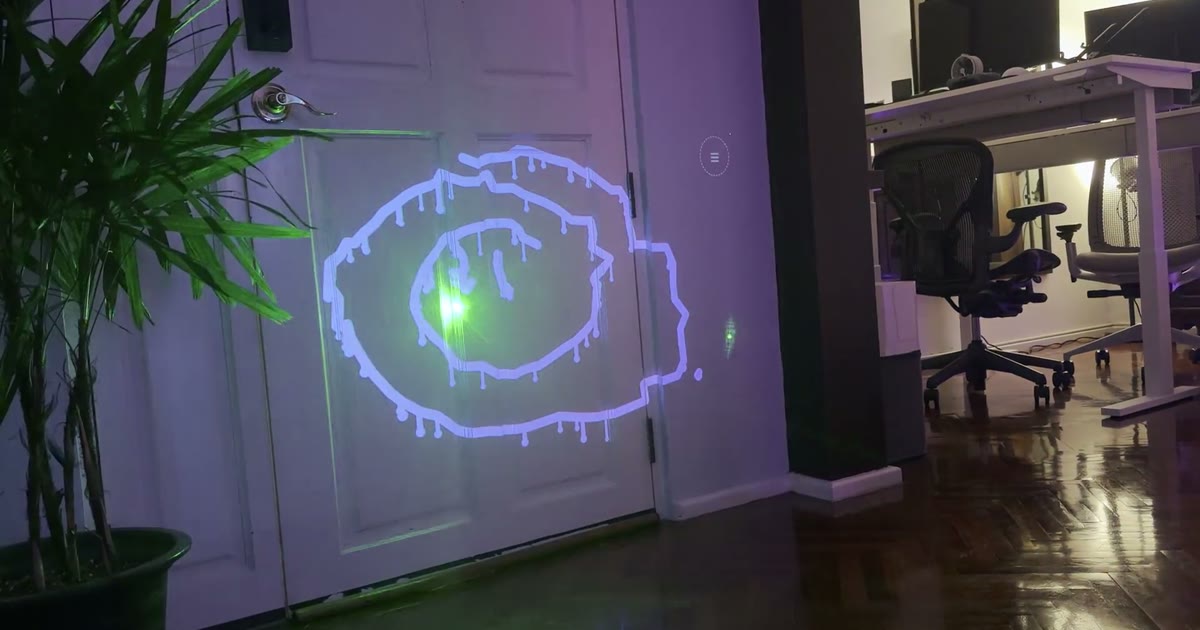
No projector needed for this one — your mouse (or finger) is the laser. Pick a brush, flip on a mode, or play tic-tac-toe against the computer by drawing an X in a cell.
How it works
Everything runs in the browser — no install, no native app.
Set up
Connect a projector as a second screen and point a webcam at the projected area. Open the control window and the projector window (press F for fullscreen).
Calibrate
One click flashes markers into the corners of the projection; the camera finds them and computes the camera→projector mapping. Then wave the laser for 4 seconds so the detector learns its brightness and colour.
Draw
Every frame the camera finds the laser dot, maps it onto the projector, and the projector renders the stroke — right where you pointed. Hold the laser in the ☰ corner to open an on-wall menu.
Features
- Six brushes: round, marker, calligraphy, neon, spray, rainbow
- Wet ink that drips down the wall
- Spin your drawing as an extruded 3D object
- Fade-out mode and kaleidoscope mirroring
- Sparkle particle trail
- Tic-tac-toe against the computer, on the wall
- Coloured border around the drawable area
- Snapshots: save photo + drawing, download as files
- Laser-operated menu — no need to touch the laptop
- Reflection-robust tracking for shiny floors
- Works with green or red lasers
- Zero dependencies, MIT-licensed, open source
The backstory
The inspiration came from mzeltner (Michael Zeltner) and oneup (Florian Hufsky) of Graffiti Research Lab Vienna, who around 2007 built their own laser marker and tagged buildings across Vienna with it. They in turn were inspired by the original Graffiti Research Lab in New York and its L.A.S.E.R. Tag project — the same idea: a camera, a projector, and a laser pointer as the pen, writ large on the side of a building.
Here's Bre Pettis talking with Michi about Laser Tag in Vienna:
This project is a from-scratch reimplementation of that idea for the browser — no Processing, no install, just a laptop, a webcam and a projector.
What you need
A laptop with Chrome, a projector (any HDMI projector works — it's just a second screen), a webcam that can see the projected area (the built-in one is fine), and a laser pointer. Green shows up best on camera.
Discussion (0)
Sign in to join the discussion. Free account, 30 seconds — email code or GitHub.
Sign in →No comments yet. Sign in and be the first to say something.