Gemini 3.5 and Antigravity come to Google NotebookLM
Mirrored from Ars Technica — AI for archival readability. Support the source by reading on the original site.

Google’s NotebookLM was one of the company’s first forays into generative AI technology, and in un-Googley fashion, it hasn’t been shut down yet. In fact, NotebookLM is getting one of its biggest updates, ever, today, moving to the latest Gemini 3.5 model, support for more file types, and streamlined web source integration. Google also says NotebookLM will be able to do more with all those queries thanks to embedded support for Antigravity.
Gemini 3.5 Flash debuted at Google I/O this year, promising much faster and more efficient processing. Google has claimed that companies worried about token costs can save big by moving their projects to the new Flash model while also getting outputs that are of similar or better quality. Those improvements are now filtering down to other Google products. NotebookLM, which launched in 2023 at the very beginning of the AI boom, lets you analyze specific sources like documents and webpages with Google’s latest AI models.
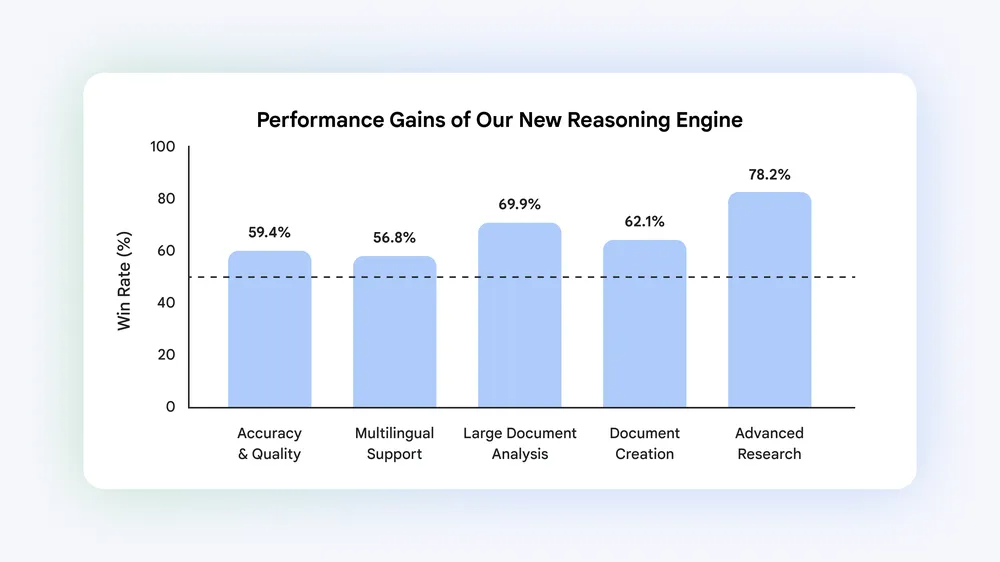
Google conducted side-by-side evaluations of NotebookLM on the old Gemini 3.1 branch and with the updated 3.5. The company is being somewhat vague about the nature of the tests, breaking things up into “top five core evaluation dimensions,” which are Accuracy and Quality, Multilingual Support, Large Document Analysis, Document Creation, and Advanced Research. In these tests, Google says NotebookLM averaged a 65 percent win rate versus the older model.
NotebookLM also now has its own “cloud computer,” which allows NotebookLM to use Antigravity to write and run code in service of your research goals. Google says NotebookLM will come with a set of more than 100 software skills that can help you build workflows with your notebooks that previously would have required you to jump between apps.
This update will also expand NotebookLM beyond text outputs. The research bot will now be able to generate documents for you across a variety of formats. Documents are added to the Studio Panel, where infographics, quizzes, audio overviews, and other specialized outputs go. You can even prompt NotebookLM to make edits to these files after they’ve been created. Google plans to add more file types over time, but it’s starting with the following:
- Data visualizations and charts (png, svg)
- Documents (PDFs, docx, markdown, text files)
- Images with Nano Banana (png, jpg, gif)
- Structured data (csv, json)
- Microsoft Excel (xlsx)
- Microsoft PowerPoint (pptx)
NotebookLM’s reliance on your sources is what has made it distinct from other implementations of Google’s AI tools, but this update can find some of those sources for you. If you need more context in a notebook, Google has expanded the app’s ability to import webpages. Right from the chat interface, you can ask Gemini to find sources fitting your needs, and it presents a “research report” with the option to import all or some of those as sources. All future interactions with the Notebook will use those sources in addition to the ones you’ve provided manually.
These features are starting to roll out today, but most NotebookLM users won’t see any changes just yet. Gemini 3.5 and the other improvements are coming first to AI Ultra subscribers, as well as Workspace business customers with AI Ultra Access and AI Expanded Access. Other Google accounts will see the updates in the near future.

Discussion (0)
Sign in to join the discussion. Free account, 30 seconds — email code or GitHub.
Sign in →No comments yet. Sign in and be the first to say something.