Introducing Gemini 2.5 Flash
Mirrored from Google DeepMind for archival readability. Support the source by reading on the original site.
Today we are rolling out an early version of Gemini 2.5 Flash in preview through the Gemini API via Google AI Studio and Vertex AI. Building upon the popular foundation of 2.0 Flash, this new version delivers a major upgrade in reasoning capabilities, while still prioritizing speed and cost. Gemini 2.5 Flash is our first fully hybrid reasoning model, giving developers the ability to turn thinking on or off. The model also allows developers to set thinking budgets to find the right tradeoff between quality, cost, and latency. Even with thinking off, developers can maintain the fast speeds of 2.0 Flash, and improve performance.
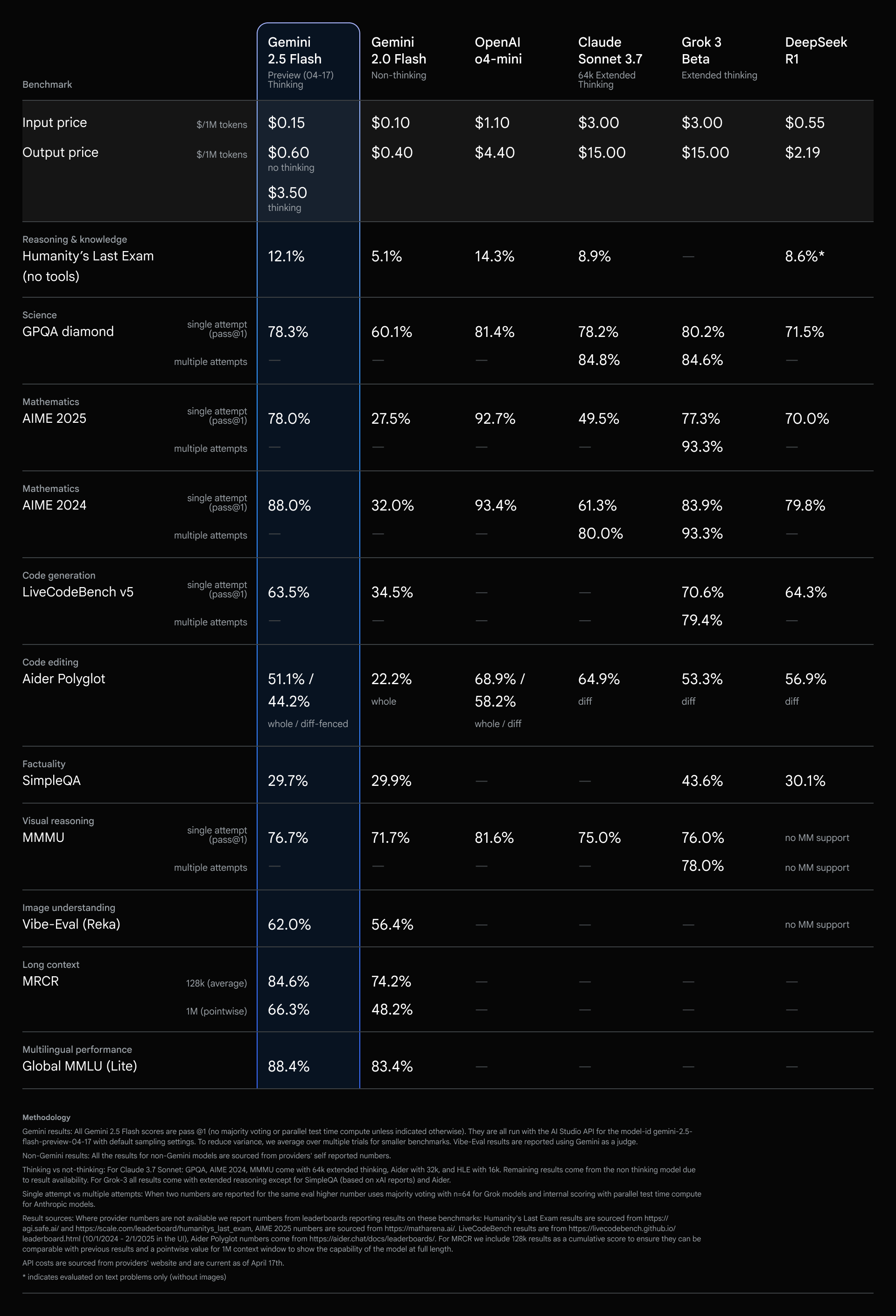
Our Gemini 2.5 models are thinking models, capable of reasoning through their thoughts before responding. Instead of immediately generating an output, the model can perform a "thinking" process to better understand the prompt, break down complex tasks, and plan a response. On complex tasks that require multiple steps of reasoning (like solving math problems or analyzing research questions), the thinking process allows the model to arrive at more accurate and comprehensive answers. In fact, Gemini 2.5 Flash performs strongly on Hard Prompts in LMArena, second only to 2.5 Pro.
Our most cost-efficient thinking model
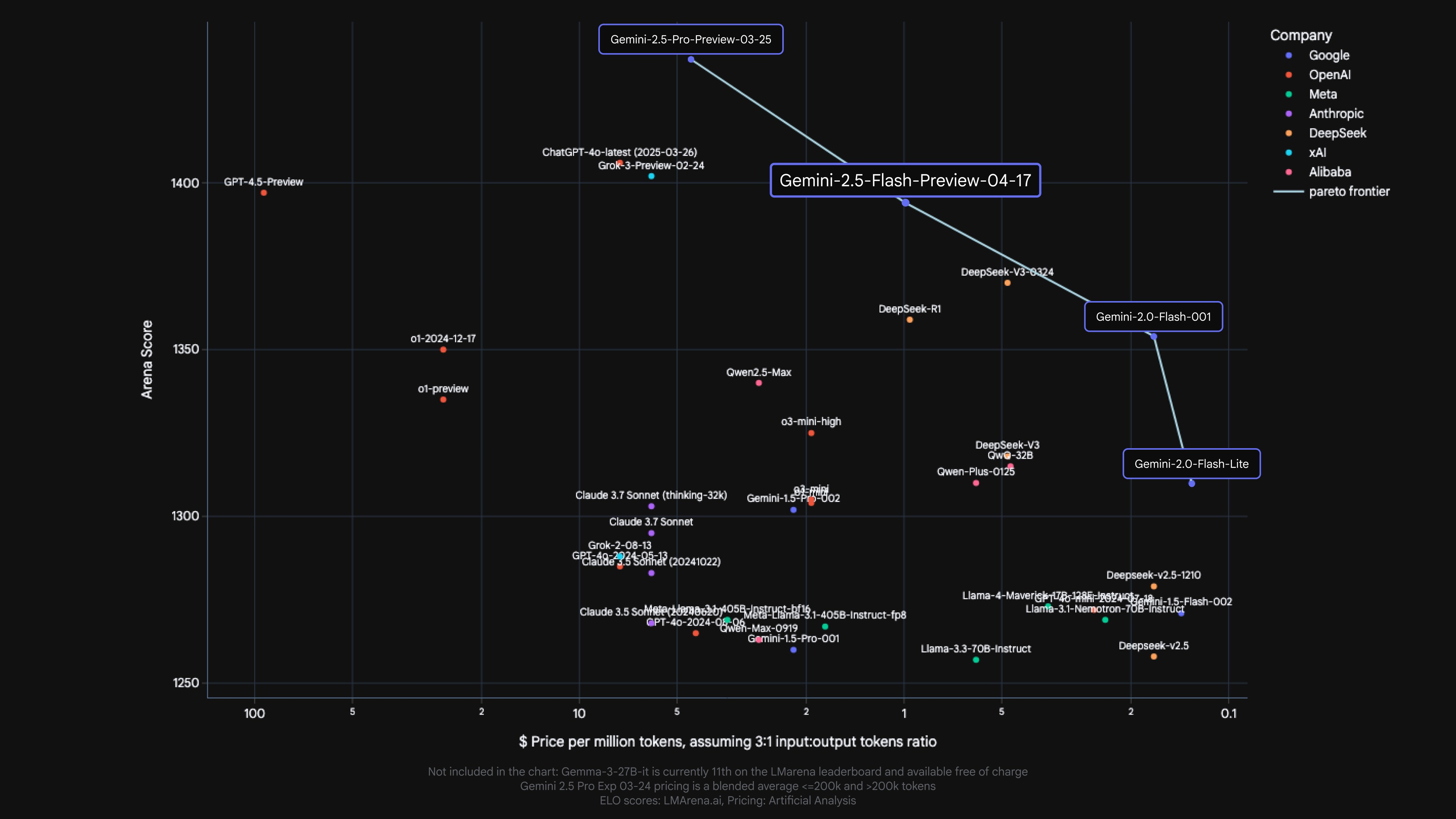
2.5 Flash continues to lead as the model with the best price-to-performance ratio.
Fine-grained controls to manage thinking
We know that different use cases have different tradeoffs in quality, cost, and latency. To give developers flexibility, we’ve enabled setting a thinking budget that offers fine-grained control over the maximum number of tokens a model can generate while thinking. A higher budget allows the model to reason further to improve quality. Importantly, though, the budget sets a cap on how much 2.5 Flash can think, but the model does not use the full budget if the prompt does not require it.
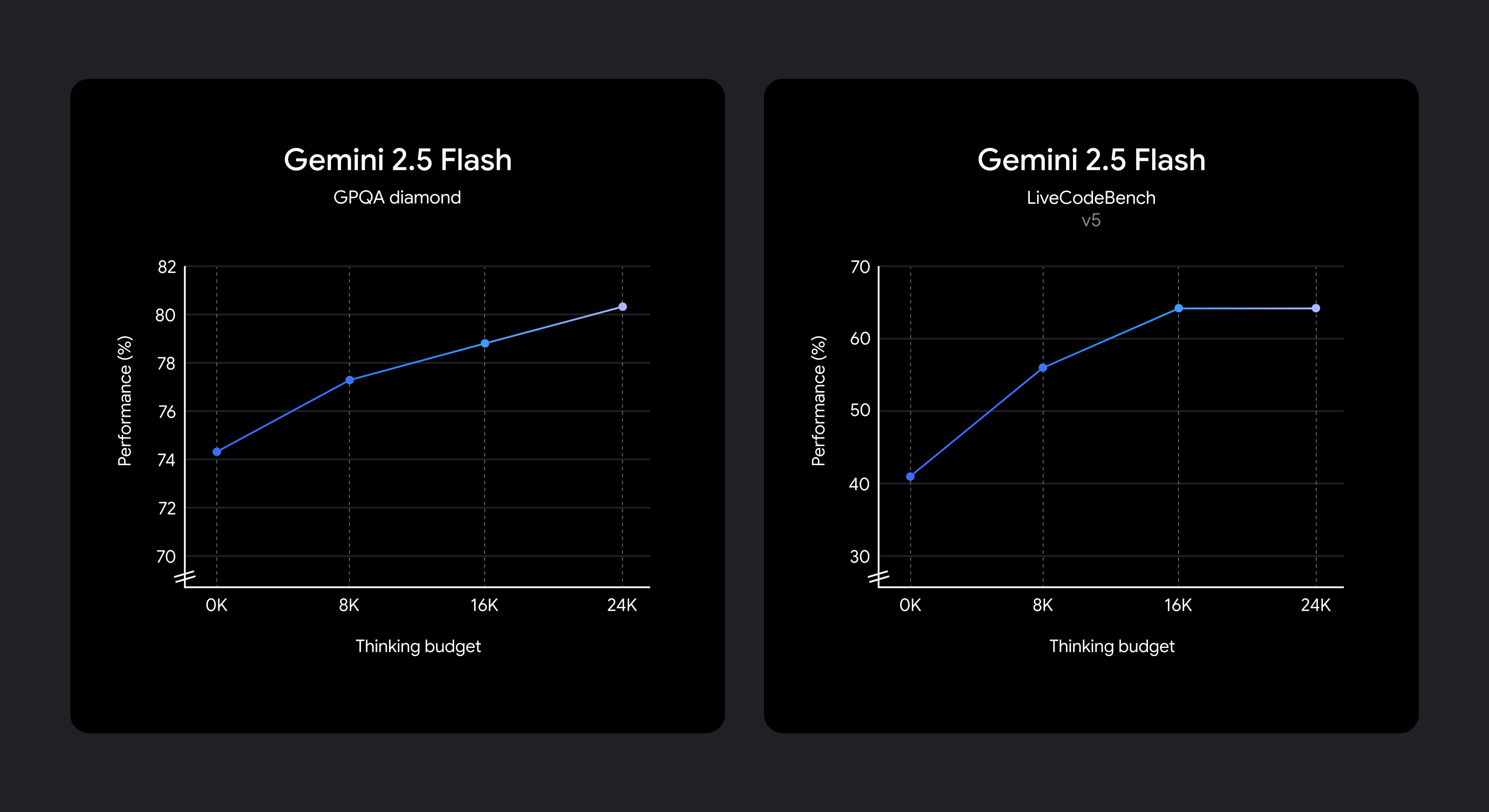
The model is trained to know how long to think for a given prompt, and therefore automatically decides how much to think based on the perceived task complexity.
If you want to keep the lowest cost and latency while still improving performance over 2.0 Flash, set the thinking budget to 0. You can also choose to set a specific token budget for the thinking phase using a parameter in the API or the slider in Google AI Studio and in Vertex AI. The budget can range from 0 to 24576 tokens for 2.5 Flash.
The following prompts demonstrate how much reasoning may be used in the 2.5 Flash’s default mode.
Prompts requiring low reasoning:
Example 1: “Thank you” in Spanish
Example 2: How many provinces does Canada have?
Prompts requiring medium reasoning:
Example 1: You roll two dice. What’s the probability they add up to 7?
Example 2: My gym has pickup hours for basketball between 9-3pm on MWF and between 2-8pm on Tuesday and Saturday. If I work 9-6pm 5 days a week and want to play 5 hours of basketball on weekdays, create a schedule for me to make it all work.
Prompts requiring high reasoning:
Example 1: A cantilever beam of length L=3m has a rectangular cross-section (width b=0.1m, height h=0.2m) and is made of steel (E=200 GPa). It is subjected to a uniformly distributed load w=5 kN/m along its entire length and a point load P=10 kN at its free end. Calculate the maximum bending stress (σ_max).
Example 2: Write a function evaluate_cells(cells: Dict[str, str]) -> Dict[str, float] that computes the values of spreadsheet cells.
Each cell contains:
- A number (e.g.,
"3")
- Or a formula like
"=A1 + B1 * 2"using+,-,*,/and other cells.
Requirements:
- Resolve dependencies between cells.
- Handle operator precedence (
*/before+-).
- Detect cycles and raise
ValueError("Cycle detected at <cell>").
- No
eval(). Use only built-in libraries.
Start building with Gemini 2.5 Flash today
Gemini 2.5 Flash with thinking capabilities is now available in preview via the Gemini API in Google AI Studio and in Vertex AI, and in a dedicated dropdown in the Gemini app. We encourage you to experiment with the thinking_budget parameter and explore how controllable reasoning can help you solve more complex problems.
from google import genai

client = genai.Client(api_key="GEMINI_API_KEY")

response = client.models.generate_content(
  model="gemini-2.5-flash-preview-04-17",
  contents="You roll two dice. What’s the probability they add up to 7?",
  config=genai.types.GenerateContentConfig(
    thinking_config=genai.types.ThinkingConfig(
      thinking_budget=1024
    )
  )
)

print(response.text)Find detailed API references and thinking guides in our developer docs or get started with code examples from the Gemini Cookbook.
We will continue to improve Gemini 2.5 Flash, with more coming soon, before we make it generally available for full production use.
*Model pricing is sourced from Artificial Analysis & Company Documentation

Speeding Up AI: Bringing Google Colossus to PyTorch via GCSFS and Rapid Bucket

Build Long-running AI agents that pause, resume, and never lose context with ADK

Supercharging LLM inference on Google TPUs: Achieving 3X speedups with diffusion-style speculative decoding

Turn creative prompts into interactive XR experiences with Gemini

How we built the Google I/O 2026 Save the Date experience
Discussion (0)
Sign in to join the discussion. Free account, 30 seconds — email code or GitHub.
Sign in →No comments yet. Sign in and be the first to say something.